Enterprise solutions that make your team's tools more efficient
Xertone builds SaaS solutions for in-demand Microsoft toolsets. Our most-requested product, TeamsPIM, brings Microsoft Entra PIM workflows into one place — Microsoft Teams — with your existing security controls preserved.
- Microsoft PartnerCloud Partner Program
 Entra ID P2 / GovernanceJust-in-time access
- Microsoft AppSourceSubscription available
 Microsoft Graph NativeEntra ID + Azure resources
PIM approvals in email. Activations in the portal. Your team in Teams.
TeamsPIM gives requesters, approvers, and admins one place: approvals land as Adaptive Cards in Microsoft Teams with full justification context, and eligible users request and activate roles from a Teams dashboard — all on your existing Microsoft Entra PIM policies.Microsoft Entra PIM scatters its workflow across surfaces: approval requests arrive by email only — from MSSecurity-noreply@microsoft.com, with a fixed, non-configurable 24-hour approval window — activations live in the Azure portal, and none of it reaches Teams.Source: Microsoft Learn — PIM approval workflow and email notifications, 2026.
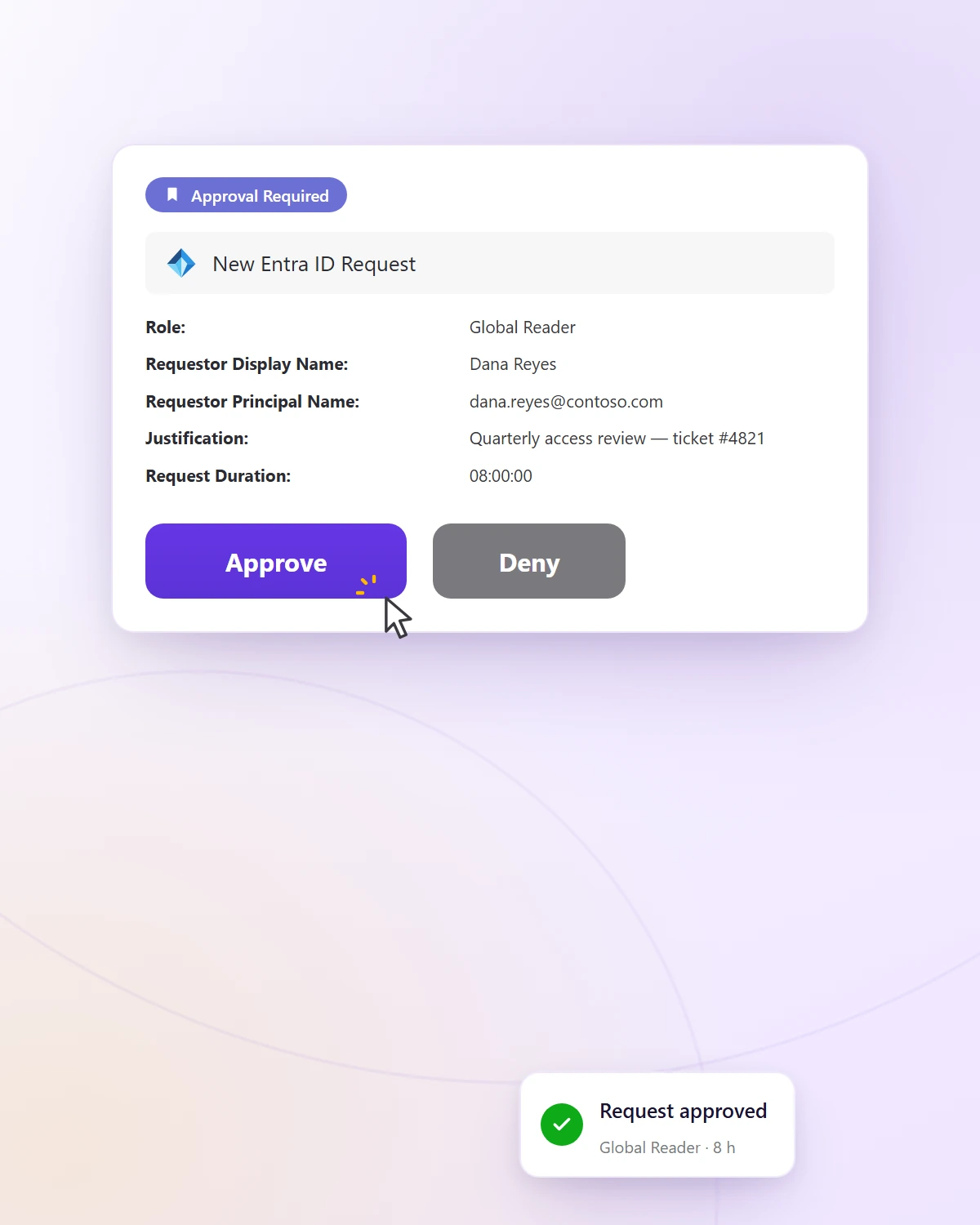
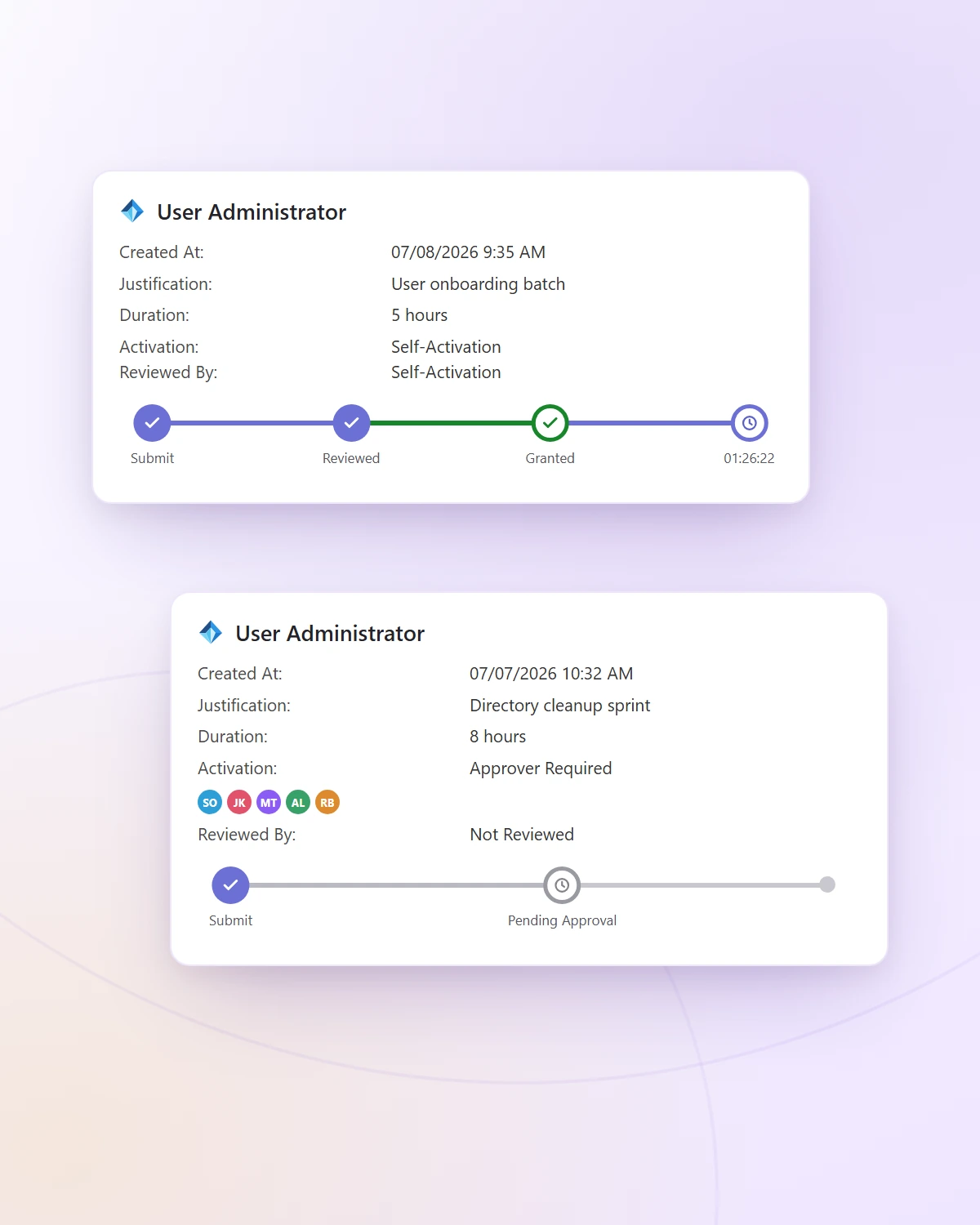
TeamsPIM in Microsoft Teams — the approval card approvers act on, and the dashboard where eligible users request, track, and activate roles.
Approve without leaving Teams
Today, approving a request means leaving Teams for entra.microsoft.com, signing in, and finding the pending item before the 24-hour window closes. TeamsPIM puts the request and the Approve / Deny action in Teams — the Azure portal stays available whenever you want it.
Notifications where you'll see them
A PIM approval email is easy to miss in a busy inbox. Approvers instead receive an Adaptive Card in Teams with the full request context — role, duration, and justification — visible and actionable on desktop and Teams mobile.
One-click activation, every eligible role
Eligible users see all their roles in one dashboard and activate with a single click — instead of a separate portal round-trip per role. Every request still follows your existing Microsoft Entra PIM policies and is fully audit-logged.
TeamsPIM surfaces PIM activation and approvals in Teams. Role assignment propagation times are determined by Microsoft's platform — they are unchanged by where you initiate the activation.
A SaaS company focused on the Microsoft ecosystem
Xertone designs and operates SaaS products that live inside Microsoft 365 — built on Azure, authenticated with Microsoft Entra ID, and powered by Microsoft Graph.

Teams-native workflow apps
Software delivered inside Microsoft Teams, where enterprise teams already work. TeamsPIM, our most-requested product, is privileged-access workflows done the Teams-native way.
Identity & access tooling
Practical tools around Microsoft Entra — privileged-access workflows in Teams today, with more solutions on the way.

Built on Microsoft Azure
Operated on Azure infrastructure with Microsoft Entra ID authentication and Microsoft Graph — no third-party identity providers, no bolt-ons.
In-demand Microsoft toolsets we build for
Teams Copilot
 Azure DevOps
 SharePoint
Building something in the Microsoft ecosystem? Talk to us →
Frequently asked questions
TeamsPIM is a Microsoft Teams app, sold as a subscription on Microsoft AppSource. The service runs on Xertone's Azure infrastructure, so there is nothing for your team to host; your tenant connects through Microsoft Entra ID admin consent. The setup steps are in the TeamsPIM setup guide on teamspim.com.
PIM role and activation data is queried live through Microsoft Graph and is not persisted in Xertone systems. TeamsPIM stores subscription and license records, request state while a request is open, and a record of approval decisions. See our Privacy Policy for full details.
TeamsPIM works alongside your existing Microsoft Entra PIM configuration. It doesn't modify your PIM policies — it gives your team one place in Teams to run the same workflows, with the Azure portal still available whenever you want it.
Your administrator subscribes, grants admin consent and assigns licenses; our team completes the setup of your environment on our side. The steps are in the TeamsPIM setup guide on teamspim.com, and our team is on hand throughout.
With a free trial: one month in your own environment, with deployment support, onboarding and a success review with our team. Start one through the contact page and we set it up around your environment.
TeamsPIM is built by Xertone LLC, a SaaS solutions company based in Plano, TX, focused on software for the Microsoft enterprise ecosystem.
Enterprise-grade by design
Live data from your tenant
PIM role and activation data is queried live through Microsoft Graph and is not persisted in Xertone systems. TeamsPIM keeps subscription and license records, open request state and a record of approval decisions in an environment set up for your organization.
Microsoft Entra ID authentication only
No external identity providers. No separate logins. TeamsPIM uses your existing Microsoft Entra ID sign-in and admin consent.
Audit-ready from day one
Full attribution logging for every TeamsPIM action — who, what, when, and why. Complements Microsoft Entra PIM's native audit trail for compliance reviews.
Bring your PIM workflow together
Privileged-access management in Microsoft Teams — where your IT team already works, communicates, and collaborates.